
Windows Installation
Download Zip File:

After downloading the dbwrench.zip file:
- Extract (unzip) this file to any folder.
The extracted folder structure will look like this:
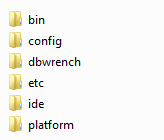
- Go to the bin sub folder.
- To launch DbWrench, run dbwrench64.exe.
- NOTE: If you extract DbWrench into either of the Program Files folders you may have to run DbWrench As Administrator. If it's extracted into a regular folder, Run As Administrator shouldn't be necessary.